Trial reel strategy · Ellie Snow, Ascend Content · 12 min read
The Triple-Hook Matrix
Two minutes before the script. Twenty-four hours after you post it. Then you know whether the concept has proof behind it, before you build out the rest of the variations.
Everything on this page is ours except the quoted section near the end, which is Instagram's own description of the feature, cited.
About this method
- What it is:
- The Triple-Hook Matrix, the Ascend Content trial reel strategy, written by Ellie Snow. A way to test a content concept with Instagram trial reels before it goes on the feed.
- Who wrote it:
- Ellie Snow, founder of Ascend Content.
- Who it's for:
- founders and creators who run a real business and post on Instagram, alone or with a team.
- What you can do after reading it:
- take one concept, put it in one format, film three verbal hooks in the same setting, cut three on-screen titles, make each variant different enough to get tested, post them all as trial reels with auto-share off, read views, watch time and skip rate at 24 hours, and know when to post, when to wait, and when to just post it organically.
- Next step:
- See the end of this document.
01The unit you test is the concept
A concept is an idea. A formatted idea that can be made in different formats, with different scripts, aimed at different outcomes and different people. It can be aimed at people who've never heard of you, people who are deciding, or people who are ready to buy. One concept can carry 20 or 30 different video variations.
You're looking for proof behind the idea itself, before you produce the rest of them.
02The example: a business transformation reel
We'll use a transformation reel, specifically a business transformation reel. It takes the viewer through the creator's story: where they started, in some capacity, and where they are today, in some capacity.
There are a ton of ways to turn that one concept into variants. Before you spend the time filming them, getting them edited, and posting them, you need to know whether there's proof behind the concept itself.
03Put it in one format first
Take the concept and put it into one format. That could be a talking head "yap" style reel, a green screen, B-roll with a voiceover, a ranking video, a listicle. There are a lot of formats to choose from. The yap video is usually the easiest to create and takes the least time, so that's where we start.
Say we put the transformation concept into a yap reel. The idea is to show the viewer a transformation the creator had.
An example script, for a made-up creator. Not our numbers.
"Six months ago, I was dead broke, living in my parents' basement, trying to make money doing literally anything, including selling fake AirPods online. And now today, I'm making $50,000 a month living in Miami, and I have incredible friends and a network of people where I live. Here's the three things that I did in that time period to get me to where I am today."
Then the creator lists the three things. That's a script that works well for the yap format.
04Before the script, film the hook three ways
Same setting. Same CTA. Only the hook changes.
Write three variants of the hook. Verbal hooks, since this is a yap video. Use three of the hook structures you already write with, and make each one fit this concept. Film all three, ideally in the same setting. Then film the script of the video with the same call to action and everything else identical. The only thing that changes is the verbal hook.
There should be no reason that, before you film the full script, you don't film three sentences that could drastically change the outcome of your video. It takes quite literally two minutes to film these extra sentences. It can be the difference between your video going drastically viral and your video completely flopping.
"It takes quite literally two minutes to film these extra sentences... could be the difference between your video going drastically viral and your video completely flopping."
05In post, cut three on-screen title hooks
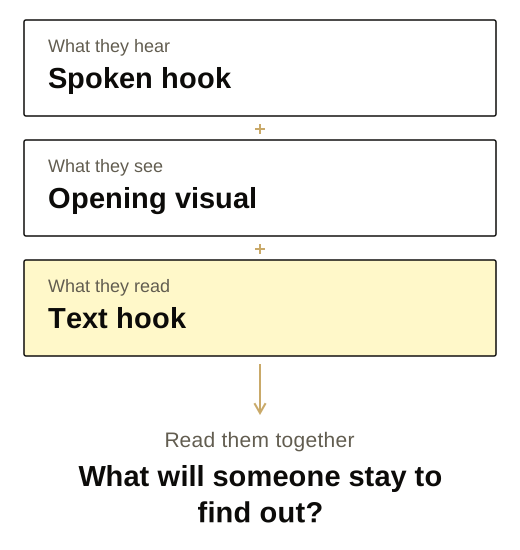
In the edit, create three different on-screen title variants. These are part of the visual hook. They're what the viewer reads and sees, even with the sound off.
The title should not always directly match what you say in the hook. If the title says the same thing the hook says, there's no curiosity loop. You're telling them and showing them the same thing at once, so there's nothing left to want.
The title opens a loop the spoken hook doesn't close. Someone sees the title, hears what you're saying, and the gap between the two is what makes them want to learn more.
Three rules for every title:
- Around five to seven words.
- Three lines on the feed at most.
- Optimized completely for curiosity and for reach with people who don't follow you yet. The visual hook never gets nitty gritty.
06Make every variant different enough that Instagram doesn't flag it
For your videos to actually get pushed out as trial reels, they need to be different from each other. Otherwise Instagram flags them as similar videos, and your trial reels don't get tested optimally. It happens often. You get a notification that the trial reel looked similar to something you may have posted before.
Ways to make a variant different in the edit:
- Mirror the video. In the Edits app, or ask your editor to mirror one of the variants.
- Change the formatting of the on-screen text: the color of the title, the font, where it sits on the screen.
- Swap out some images for different ones, or put a green screen behind you with a photo that fits.
- Change the speed of the video.
- Add background audio, or change the background audio.
- Change the caption of the post.
The caption on each trial reel should be different so it doesn't look like a duplicated video with the exact same everything. And if you filmed three different verbal hooks, you're already ahead, because the video itself is actually different.
07Post them all as trial reels. Read views, then skip rate.
Views and skip rate. Not likes.
Auto-share off. Every single time.
Post every variant you made as trial reels, all at once. The timing between them doesn't matter. Typically that's three. Sometimes five. Sometimes nine: three verbal hooks, each with a different on-screen title, could give you nine videos out of one shoot. If you filmed one concept with one verbal hook, you're probably safer posting three.
Turn the auto-share setting off. Every single time.
A trial reel goes out to a cold audience, people who don't know who you are and don't follow you yet. The more views your video gets from that cold audience, the more reach you get overall. Trial reels are optimized for reach, so views and watch time are the first thing to look at.
Then open the trial reel insights and look at skip rate. Skip rate is what impacts your views the most. Trial reels always go to a cold audience, so the people who stop on your video may or may not have seen you before. If they aren't skipping, that's the better video, even against one with more views and a higher skip rate. Shares are a big thing too. Likes are the least important number in trial reels. People like a video and keep scrolling. Since they don't follow you, they have no obligation to like it, so any other interaction matters more.
08Twenty-four hours later
After about 24 hours of testing, come back and read the results. No outlier? Then whichever variant was the top performer, post it to your feed as a new video. A fresh upload, not the Share to everyone button.
09The exception: when it's winning, don't post it yet
Here's the exception. Say your trial reels usually land anywhere from 200 to 500 views, and you come back at 24 hours to one sitting at 5,000. That's an outlier.
What counts as an outlier is a judgment call against that account's own baseline in trial reels. If you want a number, use about five times your usual trial reel views. Averaging 10,000 views in trial reels means nothing if every trial reel gets 10,000. One at 50,000 is the outlier.
Do not graduate it. Do not post it live yet.
When it's winning, wait.
Wait another 12 hours, 36 hours of testing in total, and let the trial reel keep reaching. As it continues to grow and cook up in the trial reel function, repeat the process with other videos from your vault. After 36 hours of total testing, graduate it from trial reels with the Share to everyone button. That's a different action from the 24-hour one, and it keeps the momentum the reel already has.
10When nothing beats your average
This doesn't apply every single time. If all of your trial reels come in at or below the reach you normally get when you post organically, post the video to your feed organically. It's the best possible version that could have gone out. The test still did its job.
11A real one: Marshall's account
Marshall is a client. His trial reels run anywhere from a couple hundred views to a few thousand, which is what the list below shows. On his videos we test different variations, specifically the on-screen title hook, and sometimes a different image overlay when it's a concept we want to give the most potential reach.
Here are two rows from his trial reels list. These three are the same video with three different on-screen titles: 299, 260 and 2,583 views.
Below them, the same setup, and only two of that set are there, at 274 and 290. The third variant is missing, because it was the outlier. Instead of reposting it as a brand new video, we graduated it from trial reels and let it keep pushing momentum.
It's now Marshall's most viewed video, at 270K views live on his page.
The insights on that reel show 271,388 views, 271,145 of them on Instagram, and a chart of this reel climbing against the flat line of his typical reel. They also show the panel Instagram calls "What impacts your views," with the note "Rates are listed in order of importance to reach," and skip rate is first on the list. Instagram ranks it first too.
12The whole thing
One concept, one format, three hooks, three titles, distinct variants, all up as trial reels, auto-share off. At 24 hours: the top performer to your feed as a new video. An outlier: wait to 36, then graduate it. Nothing above average: post it organically.
| What you see at 24 hours | What you do |
|---|---|
| Top performer, no outlier | Post to feed as a new video. A fresh upload. |
| An outlier, about 5x your usual trial reel views, or your judgment | Wait 12 more hours, 36 total, then graduate it with Share to everyone. |
| At or below your average | Post it organically. |
13Your matrix
Fill this in for one concept. Print it, or keep it on your phone. Every line on it is a step from the method above.
Concept
Format
Call to action (the same on every variant)
Verbal hooks, filmed in the same setting, before the script
Hook 1
Hook 2
Hook 3
On-screen titles, cut in post. Five to seven words, three lines at most, each one opens a loop the spoken hook does not close
Title 1
Title 2
Title 3
The matrix. One variant per cell, fill the cells you use (typically three, sometimes five, sometimes nine). A different caption on each. Make each one different: mirror, text formatting, images, speed, audio.
- Auto-share: off.
The read, about 24 hours after posting as trial reels
Views on each variant (and watch time if you have it)
Skip rate on each variant
Your account's usual views on a trial reel
Top performer
- No outlier: post the top performer to the feed as a new video.
- An outlier (about 5x your usual trial reel views, or your judgment): wait 12 more hours, 36 total, then Share to everyone.
- At or below your average: post it to the feed organically.
14Run it this week
The method in order. Ten boxes.
RefWhat Instagram says about trial reels
The method above is ours. The facts below are Instagram's, quoted from Instagram's Help Center article on trial reels, which is the current reference, and from the announcement of the feature.
creators.instagram.com Trial Reels: Try Content with Non-Followers First to See What Performs BestSource: Instagram Help Center, "About trial reels on Instagram", help.instagram.com/835643311711702. Source: Instagram for Creators, "Trial Reels: Try Content with Non-Followers First to See What Performs Best", creators.instagram.com/blog/instagram-trial-reels, December 10, 2024.
From the Help Center:
- "Trial reels on Instagram let you experiment with new ideas and get early feedback on whether your content resonates by allowing you to share reels with accounts that don’t follow you."
- "Before you can begin to use trial reels, you’ll need a public Instagram account." "If you have a professional (business or creator) account, you must have at least 200 followers." "If you have a personal account, you must have at least 1,000 followers."
- "Make sure to create a new reel. Your trial reel may get limited reach if Instagram detects that you’ve previously shared the same content."
- "After you share your trial reel, your followers won’t see it in feed or Reels. Trial reels don’t appear in your profile unless you decide to share them to everyone."
- "Some followers may still see your reel in other places. For example, someone might see your trial reel if it’s shared with them in a direct message, on a page that shows reels with the same audio, or in the results of search engines."
- "You’ll see insights on your trial reel within 24 hours after sharing so you can understand how it is performing." The insights named are "Views, Likes, Comments and Shares."
- "Trial reels may take longer to get views because they’re being shown to people who don’t follow you. Trial reels are evaluated independently in Instagram’s ranking and don’t impact the performance or ranking of your standard reels content."
- On sharing to everyone: "Your reel will now be displayed on the main grid and reels tab of your profile, and may be seen by your followers in their feed and Reels tab."
- On automatic sharing: "When you turn on Share to everyone automatically, your reel will automatically be shared if it’s performing well soon after you publish it, based on signals like views and engagement."
From the December 2024 announcement:
- "Trial reels will be shown to non-followers first."
- "Before sharing, tap the toggle to turn on 'Trial'."
- On automatic sharing at launch: "you can choose to have Instagram automatically share your trial reel with followers if we determine it's performing well based on the views it receives within the first 72 hours."
Want this run for you?
This is one page of how Ascend Content runs an account. If you'd rather it ran for you, book a call with me.